intro to AI
Hello, dear friend, you can consult us at any time if you have any questions, add WeChat: daixieit
2 Programming Section [50 Points]
2.1 Setup
All programming assignments for this course use Python.If you're new to Python or not very experienced with it,please come to office hours;we’re happy to help!We recommend checking out the Python section in the Resources document on Google Drive.We have also shared a document Debugging Tips to help you debug your code.
We highly recommend creating a new virtual environment for the assignment under the Coding folder.You can then simply install the requirements by running the command python -m pip install -r requirements.txt
2.2 Problem Statement
For this programming section,you will be working on creating a Tic-Tac-Toe (TTT) AI and Connect-4 (C4) AI. You will be using minimax with αβ pruning in Agent.py to create an agent that will predict the best set of moves to maximize the chances of winning in either game.If you are not familiar with the rules of these games,you can learn about the rules for TTT and C4 here.
The assignment folder contains these files:
·Agent.py
·Game.py
·TTT.py
·Connect4.py
·requirements.txt
Agent.py
The relevant function here is:
·minimax(self,board,depth,maximizingPlayer,alpha,beta):this is a recursive function for which you must complete the implementation.You must complete this function using aβ pruning,as regular minimax will take too long to run.When imple- menting the function, it is important to break ties by prioritizing winning in the fewest moves (losing with as many moves as possible). The output of this function is the move made and the score.
Game.py
This file references the two games we have implemented for you,Tic-Tac-Toe and Connect 4,and this is where you will test your implementation with the tests.An important variable is:
·turn:this variable decides whose turn it is,the human or AI.It is randomly initial- ized to one of the players in the main method.However,if you are first testing your implementation,you may want to initialize it to a specific player for consistent results.
TTT.py and Connect4.py
Both files implement their respective games and share important function names for easy implementation of the minimax function.You should not modify these functions,but familiarize yourself with them,as they might be useful in writing minimax.
Important functions are:
·get_valid_moves(board):returns list of columns/coordinates where a move can be made based on current board.
·play_move(board,move,player):makes a deep copy of the board and returns the updated board with the new move made by a player.
·heuristic_value(board,player):calculates and returns the score for a player based on that player's moves.
·is_winner(board,player):boolean function that determines if either player has put their game piece in 3 consecutive cells for TTT,or 4 consecutive cells for Connect 4
·is_full(board):boolean function that returns if the board is full
One of the main differences in the games is how you view them.Since TTT is quite basic, it can be played in your terminal.Since Connect 4 is a 6x7 grid,we have included code to simulate the game in another window to better visualize the board.
2.3 Testing locally
We have provided four test cases for Connect 4 that you can use to test your implementation. Since Tic-Tac-Toe does not have many solutions,you can test its correctness using the terminal or make your own tests.
To try your code without tests,you can run python Game.py TTT or python Game.py C4.
To try the test cases for C4,you can run
python Game.py C4 test[n].txt where n is the test number from 0 to 3.
In expected_results.txt,you will see the columns you need to make your move as the human, how many moves it should take the agent to win,and the winning combination stated by its row and column location.Test cases 1,2 and 3 are identical on Gradescope.There are no hidden test cases -your score on Gradescope is the score you can expect to receive for this section.
To better visualize the local tests,you can view the final board state for each test below in Figure 2.The dotted line is the winning combination by the agent.
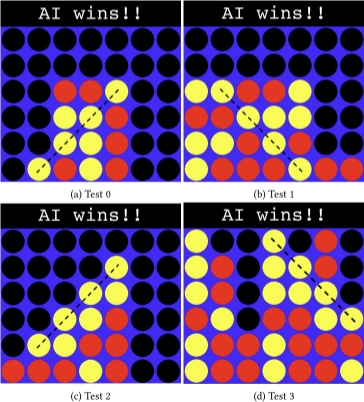
Figure 2: Final board states for the local tests
2025-10-13