IT5004 Enterprise Systems Architecture Fundamentals Assignment 1: Requirements Analysis
Hello, dear friend, you can consult us at any time if you have any questions, add WeChat: daixieit
IT5004 Enterprise Systems Architecture Fundamentals
Assignment 1: Requirements Analysis
Easy POS
Easy POS (http://www.easypos.com.sg) is a new Point-Of-Sales (POS) solution that is newly launched to provide easy to use POS solutions for various businesses. As a start, the service provider has built a simple POS solution for the Food and Beverages (F&B) industry, specifically targeting restaurants and cafes. The solution is a comprehensive solution to automate F&B operations. It comes with various software and hardware requirements such as tablets for ordering and taking queue, a website for customers to register as members online, and mobile application for businesses to push out deals to their customers.
The Easy POS system generally allows 3 main types of users: general staff, managers, and customers. General staff interacts with the system through the POS machine (Figure 1). Managers have the same access as general staff except that they can perform additional features. These additional features include voiding an order item or waiving certain charges such as service charge or Goods and Services Tax (GST). They can also send promotional coupons to customers through the system. Customers can receive these promotion coupons and apply them when making an order through the self-service tablet placed at each dining table.
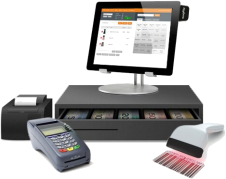
Figure 1 Example of a POS Machine
A staff must first log into the POS machine in order to use the system. Before a dish can be ordered, the dish entry and its details have to be added. Each dish entry should capture details such as the name, pricing, availability status, etc. These entries can be updated and “deleted” later on if there are any changes. As each order transaction will consist of a list of dish items and quantity, we typically do not physically delete entries away. Instead, it is a logical delete which will update the availability status to be NOT_AVAILABLE. To make an order, staff will use the POS machine and/or the Easy POS admin mobile app which can be installed on a tablet or smartphone. Staff can also view the list of order and order status (e.g. PLACED, FULLY_SERVED, PAID, etc). The order status is updated when there are changes in the order. For example, if a dish in an order is served, the status is manually updated as SERVED and when all the dishes in the order is served, the order status is updated to FULLY_SERVED.
In addition to what a general staff can do, managers have additional access rights to perform other operations. They can view the list of transactions (i.e. orders that have been made and paid) and their details to perform better planning. Managers can also see the list of customers who have registered through the restaurant/cafe website. By default, customers will receive birthday greetings, however, managers may decide to send promotion coupons to their customers on their birthday month. They might also send other general marketing mailers to their customers to make announcements (e.g. new dishes, etc).
The system maintains an audit trail of any transactions and users who are involved. Thus, it will auto logout once the session timeout. Alternatively, users can choose to manually logout in the event when there is a change in the work shift.
As illustrated earlier, customers can register through the restaurant/cafe website and/or the Easy POS customer mobile app. Once they are registered, they may receive marketing mailers or promotion coupons (as emails or push notifications). One of the key benefits of installing the Easy POS customer mobile app is the customers can make an order directly from the Easy POS customer mobile app instead of waiting for staff to serve them.
To make an order, customers first log into the Easy POS customer mobile app and select the restaurant/cafe branch. Customers will then be presented with the list of available dish items where they can then add the items and the quantity to the cart. At any point in time, customers can view the cart to see the cart details and the cart amount. Once they are ready to check out from the cart, they will press the “send order” button which will send the order to the Easy POS central server which can be seen by the restaurant/cafe staff at their system. Should the customer want to make payment through the mobile app, they are given the option to make electronic payments (credit card). They can also redeem promotion coupons by entering the promotion code. A digital receipt will be generated for any online payment and the list of receipts from current (or past visits) can be viewed in the app. Note that the mobile app only supports electronic payment through credit card. If the customers want to make a cash payment, they have to still go through the payment counter at the restaurant/cafe, and the staff will process their payment request. Customers will be given physical printed receipts if the payment is made through the counter.
1. Draw an activity diagram to illustrate the key processes that need to take place before a transaction is captured. You should assume that the system is newly set up (i.e. no data in the system) and the staff is the one taking the customers’ orders. Please adopt the swim lane approach. You should make your own assumptions (if it is not illustrated in the passage) to ensure that the flow makes sense. State any assumptions after the activity diagram. (6 marks)
2. Develop a use case diagram for the Easy POS system showing all the use cases and their associated actor(s). (6 marks)
3. Produce the fully developed use case description for the following use case using the given template. Note that when writing down the flow of events, think about how a system would have to go about processing the use case. You should make your own assumptions (if it is not illustrated in the passage) to ensure that the flow makes sense. State any assumptions after each table (if necessary). Do not forget to indicate what database record(s) is/are created/updated/deleted. (8 marks)
|
Use Case: |
Make an order using the mobile app |
|
|
Triggering Event: |
|
|
|
Brief Description: |
|
|
|
Actors: |
|
|
|
Pre-conditions: |
|
|
|
Post-conditions: |
|
|
|
Flow of Events: |
Actor |
System |
|
|
|
|
|
Exception Conditions: |
|
|
2025-09-20