GEOM185 & GEOM186 Assessment guidance notes for the GIS Applied Project
Hello, dear friend, you can consult us at any time if you have any questions, add WeChat: daixieit
Assessment guidance notes for theGIS Applied Project (Dissertation & multimedia output)
Modules GEOM185 (academic) & GEOM186 (consultancy)
The GIS Applied Project allows you to integrate and apply the learning from other modules in the programme to a topic or real-world challenge of your choice, and your dissertation will serve as a substantive example of your skills and abilities. The following information is relevant to both GEOM185 and GEOM186 dissertations.
Motivation
You will be responsible for designing, planning and implementing the study, as well as analysing the data and writing it up. You will define your project over terms 1 and 2 via seminars and tutorials. By the start of the summer term (Term-3) you will have a project proposal agreed and an academic supervisor assigned. You will be encouraged to develop your proposal in collaboration with one of the programme’s external partners and so apply your learning to a ‘real-world’ application of GIS.
Your Project will allow you take a ‘deep dive into’ an application of GIS of your choice. You will gain experience in designing and carrying out a substantial research project. This will link the theory and knowledge you gained during the taught components of the programme to a specific case-study or challenge.
• You will gain an overview of a significant body of literature in a particular study area.
• You will learn how to synthesise and structure this information. You will situate your dissertation project within this body of work and so identify gaps in research literature.
• You will formulate a research method with clearly identified aims and objectives.
• You will collect data and subject this to analysis and interpretation.
• You will produce a dissertation that reports on this significant piece of work.
Elements of the assessment
The assessments in the module are designed to guide you through the research design process throughout the taught programme.
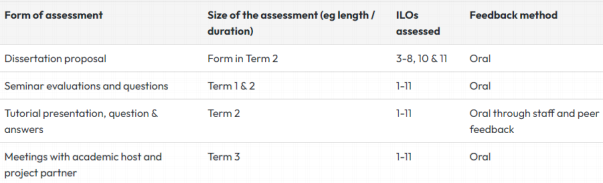
There are four elements of formative assessment on which you will receive verbal feedback. These assessments do not count towards your module grade but are intended to help you refine your ideas.
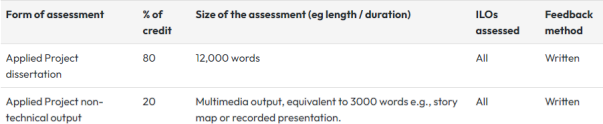
There are two elements to the summative assessment to be submitted in early September 2024. These are a 12 000 word (maximum) written Applied project dissertation and a multimedia, non-technical output equivalent to 3000 words. Decisions about the format of this second element should be discussed with you academic host and/or project partner.
Formative assessments
Summative assessments
Structure and contents of the dissertation
The Applied project dissertation should be arranged broadly as follows:
1. Title page
2. Contents
3. List of figures (including photographic illustrations).
4. List of tables.
5. Abstract. The abstract should not exceed 200 words and should
contain the essence of the dissertation but should not refer to the main body of the dissertation.
6. Main body of the dissertation – your various chapters.
7. Appendices, covering detailed material and date, elaboration of methods and techniques.
8. Reference list
There is no definitive detailed structure recommended for the substantive part (main body) of the dissertation. There is, however, such a thing as a clearly and logically structured dissertation. The dissertation should, therefore, include components 1-8 (listed above) in that particular order. The structure must be clear and logical, include an early statement of the aims and objectives, previous research, a review of relevant literature, methods, results, analysis of results and discussion, and lead to logical conclusions.
The length limit is 12 000 words, but this should be seen as a hard upper limit and not something to aim for. For this GIS programme there is an expectation that much of your analysis will be presented visually, and texts should be written concisely.
Title Page
You must put the title of your dissertation, your name, the date, and a signed acknowledgement on the title page of your dissertation. You are required to sign the following acknowledgement:
“I certify that this dissertation is entirely my own work and no part of it has been submitted for a degree or other qualification in this or another institution. I also certify that I have not collected data nor shared data with another candidate at Exeter University or elsewhere without specific authorisation.”
...........................(Your signature).
This acknowledgement is required to comply with University of Exeter regulations.
Chapters, headings and subheadings
Within individual chapters, you may wish to use sub-headings. These should be used in a logical and consistent manner. This will help the reader (i.e. examiner) navigate their way around the dissertation. There is a balance between over and under dividing the dissertation up into sections. Too many sections and subsections may break up the flow and make the dissertation appear bitty or fragmented. Too few sections or subsections will make it more difficult for the reader to work out whereabouts they are and where they are going. Organising the dissertation into sections will also help you to organise and decide where to place various bits of information. It is a good idea to include a brief statement of what each chapter is about at the beginning to help the reader work out where they are going in. A short summary at the end of each chapter can be equally valuable in helping navigation and general flow, e.g.: This chapter discusses the results of....This chapter has discussed the...and leads onto....
You can number the sections and subsections in order to help navigation. This system will enable you to refer the reader to particular sections in the text. If this type of system is used then all tables and figures can be numbered within each chapter accordingly, e.g. table 3.1 and 3.2 correspond to the first and second tables referred to in the text of Chapter 3. The list of contents will help the reader navigate their way around the report.
Figures and tables
Figures include all maps, GIS outputs, diagrams, and photographs. Tables are considered and numbered separately from figures. In all cases, an explanatory title should be provided next to the figure or table number. Figures and tables should, where possible, be integrated into the text. All figures and tables must be numbered. Tables are numbered separately from figures. For example, using the numerical system, Table 4.1 would be the first table cited in chapter 4; Figure 4.1 would be the first figure cited in chapter 4. All tables and figures should be closely integrated with, and referred to, in the text, using appropriate phrasing. It is not sufficient to simply put text and illustrations side by side hoping that the reader/examiner will make the connection.
GIS outputs and Photographs
GIS outputs such as maps should normally be prepared with one dimension equal to the height of an A4 sheet and if necessary may be folded. Maps and diagrams are expected to be generated using software packages used within the taught programme, and where this is not the case, it should be clearly stated. Each map or diagram should have a frame, with a figure number and title outside the frame. The source of the information must also be given (and listed fully in the Bibliography); e.g.: Figure 1.1: Public Drinking Spaces Visited, 1980-1998 (source: Kneale, 1999).
Photographs
Photographs, digitised images and colour scanned material may also be used if required, and these should be given a title and figure number, and suitable referencing), e.g.: Figure 1.1: An unusual growth from Smith's Head, Devon (photo: author). Separate lists of figures and tables should be included in the contents. Ensure that all your figures are clear and of sufficient size and resolution to be able to make out text and important features, i.e. not small, fuzzy, and difficult to make out.
Referencing and the bibliography
You must refer to all references using the Harvard system of referencing. All references in the reference list should match those used within the text. No additional references should be incorporated in the reference list. For consistency and time saving, consider using referencing software such as Endnote. This software stores all your references in one file and you can change the formatting between multiple styles. It is also possible through most journal websites to import the references directly into Endnote, reducing the possibility of transcription errors. Endnote is available on university computers. Internet resources: these citations (e.g. Adams and Ray, 2001) should comprise the author(s) (if known), the full title of the work (i.e. page header), the title of the complete work (if applicable) in italics, the full http address, and the date accessed. The aim is to provide the information necessary to enable the reader to appreciate the theme of the page and to access it directly from the address provided in the reference. Personal communications: Simon Turner (pers. comm.) refers to information gained from a personal communication (e.g. a letter, email or verbal conversation) with someone.
Quoting
Note that if you quote material in your text you should give the page numbers in the reference. You should also place parentheses around the quoted section.
Checking your work
Before submission, the whole text of your dissertation should be checked carefully for typing errors. You should also check that you have listed all your references and that all tables and figures are clearly presented and referenced. If you have questions about this, particularly relating to ILPs, please discuss this in advance with your dissertation advisor, a Senior Tutor or Access Ability.
Structure and contents ofthe multi-media non-technical output
This element is intended to offer an alternative format for communicating the outputs of your research and is therefore less prescriptive than the dissertation. For example, it could take the form of an ArcGIS storymap, a short documentary film, a recorded presentation or InVEnTA interactive virtual environment. It is an opportunity to communicate with a different, non-academic audience, and we encourage you to think creatively in the design of this element.
For those on the GEOM186 (consultancy) module, the partner organisation might have helpful ideas or specific requirements about the format of this element, so they are expected to be involved in discussions about this.
If you would like to discuss the suitability of ideas you have for this, or any other questions about the assessment, please contact the module convenors:
GEOM185 (Academic): Dr Georgie Bennett[email protected]
GEOM186 (Consultancy): Dr Steven Palmer[email protected]
Guidance on the use of generative AI in the dissertation
Artificial Intelligence (AI) and Machine Learning (ML) has evolved to allow pre-trained models, also called foundation models to be applied to a new way of information retrieval, education, and digital assistance. Foundation model examples relevant to the MSc in GIS include ChatGPT, LLaMA, GPT-4, Segment Anything Model, Stable Diffusion, YOLO (You Only Look Once). These tools can be valuable to support your learning and analysis. Large language models (LLM) are included here but must not be used to replace your learning so please note permitted and non-permitted use in this course:
Permitted uses:
• Task-specific GeoAI models may be applied for image classification purposes to produce data products (but not the spatial analysis or interpretation of such outputs).
• Foundation models can be used to assist code generation, editing, reviewing and commenting code.
• Use of LLM (large language models) to assist with conceptual
understanding and finding information on a topic (in a similar way as you would use a web search engine).
Not permitted uses:
• GeoAI models as a general-purpose framework to solve geospatial problems, effectively replacing the GIS workflow (to my knowledge currently not available).
• Replacing your voice in class discussions, forum posts and padlet exercises; reflective learning and critical reflection are pedagogies designed to assist your learning.
• Generating map outputs, figures, or visualisations.
• Generating written elements for your assignments including figure captions.
2025-07-09