Network Security Tasks
Hello, dear friend, you can consult us at any time if you have any questions, add WeChat: daixieit
Network Security Tasks
Introduction
This assignment includes three parts:
1. Network Packet Analysis (25 pts).
2. TCP Reset Attack (35 pts).
3. DNS Poisoning Attack (40 pts).
In the second and third tasks, you are asked to conduct the corresponding attack in simulated network environment. As the virtual environment is built via Docker, you will need to install Docker in a Linux system. Please refer to this link https://docs.docker.com/engine/install/to check out how to install Docker in Linux system.
Scripting Cheat Sheet
As the attack script is asked to be written in Python to manipulate the network packets, here is a Python example for sniffing packets with Scapy.
Install Scapy Library:
Scapy will be used in the assignment for packet manipulation, you can install it via:
|
$ python3 -m pip install scapy |
Packet Sniffing:
from scapy.all import * # Import anything from scapy library
target_src_ip = "1.2.3.4"
target_dst_ip = "5.6.7.8"
def send_rst(packet):
pass
sniff(iface="br-123456789", filter=f"tcp and host {target_src_ip} and {target_dst_ip}", prn=send_rst)
Scapy’s `sniff` method can help us with sniffing the packet in given network interface with customized filter. For the above instance, three arguments are passed:
1. iface: The interface where the packets are captured. The interfaces ’ name can be viewed via `ifconfig -a` in Linux.
2. filter: It indicates what kind of packets will be captured. In this example, Scapy only captures the TCP packets with source ip address “ 1.2.3.4” and destination ip address “5.6.7.8”.
3. prn: Callback function for each captured packet. This function will be called for every captured packet.
The complete instruction of Scapy’s `sniff` function can be viewed here
Network Packet Analysis (25 pts)
Description
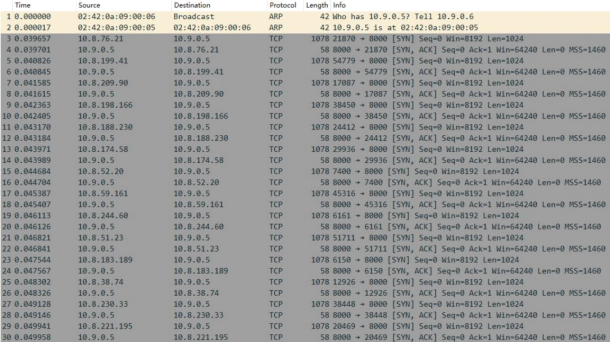
Alice has a remote cloud server, but one day she suddenly found she failed to get access to the service deployed on the server. The IT manager captured the network traffic pcap file shown as follow. Can you help to find out what happened?
Questions
l (4 pts) What's the server's IP address?
l (4 pts) What's the attacker's real IP address?
l (5 pts) What kind of attack is the server suffering from?
l (12 pts) Explain the attack happened in this scenario.
TCP Reset Attack (35 pts)
Description
Consider the following network graph:
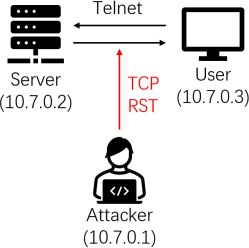
User and server has built up a stable TCP connection via Telnet. As an attacker in this LAN, you are asked to maliciously shut down the connection using TCP reset attack.
Environment Setup
Please find the attachment “TCP-Reset-Attack.zip” . Before starting the attack, you should do the following first:
1. Decompress the zip file.
2. Change directory to where “docker-compose.yml ” is located.
3. Run `docker-compose up` in command line.
4. Run `docker ps -a` in command line to check the containers ’ status (all of the three containers should be “ up ” at this step).
a) Please ensure all the three containers are successfully deployed before moving on.
5. Switch into “ user1-tcp-rst ” container via `docker exec -it user1-tcp-rst bash` and start TCP connection to server via `telnet 10.7.0.2`.
a) You need to log in the telnet with username (user) and password (user).
6. If you log in successfully, you can execute any command in the telnet panel.
Questions
Please answer the following questions in your report:
1. (5 pts) How does TCP reset attack work?
2. (10 pts) After building up a successful TCP connection via Telnet between user and server (step 5 in Environment Setup), execute `cat /home/user/flag` to get the file content. You need to provide a screenshot for this question.
3. (15 pts) Write a Python script to conduct TCP reset attack and explain how the code’s
workflow is. Your code should be able to:
a) Automatically sniff the packets in the LAN.
b) Automatically generate the attack payload and send to ruin the TCP connection.
4. (5 pts) Suggestion an effective approach to detect and prevent TCP reset attack.
Tips:
l You should conduct the attack in the container `attacker-tcp-rst`.
l Your attack script should be written in Python code,
l After all the containers are up, you can transfer the files between your host and `attacker - tcp-rst` in the shared `volumes`, which is located in `/volumes` in `attacker-tcp-rst`.
DNS Poisoning Attack (40 pts)
Description
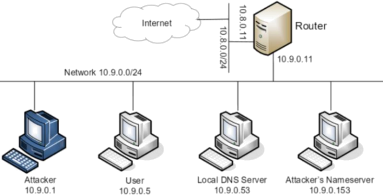
In this task, you are an attacker that has already invaded into a network environment that hosts a DNS server. You are required to conduct the DNS poisoning to attack the DNS server to trick victims who query this server for domain addresses.
We provided a script template, which currently monitors the current network to sniff all DNS packets and outputs their information to you.
You are required to complete the script to poison the DNS server and verify that, when a user queries a certain domain `www.example.com`, the DNS server would response with the address poisoned by the attacker (i.e., your script) instead of the correct address.
Environment Setup
Please find the attachment “ DNS-Poisoning-Attack.zip” .
Decompress the zip file, change directory to where “docker-compose.yml ” is located and type `docker-compose up`. It starts several docker containers to simulate the DNS server’s machine, the victim user’s machine, and the attacker’s machine. Type Ctrl-C in the same terminal will stop the running containers.
Useful commands:
l `dig`: query a domain address, as taught in the class.
l Start a terminal to enter the user (victim)’s machine: `sudo docker exec -it victim-user bash`
l Start a terminal to enter the DNS server’s machine: `sudo docker exec -it local-dns - server bash`
n The only allowed operation on the DNS server’s machine is `rndc flush`, which clears the DNS server’s cache.
l Start a terminal to enter the attacker’s machine: `sudo docker exec -it attacker bash`
n Running the script: `python3 /volume/attack.py`
u Running the provided script directly would start to monitor the network for sniffing DNS packets.
n The script is placed in /volume in the attacker’s machine, which are also mapped to the volume/ folder outside the docker containers. You can modify the script in volume/ to complete the attack and run it in the container.
Questions
l (10 pts) Please start the original script in the attack’s machine, clear the cache in the DNS server’s machine, and enter the user’s machine to query the domain `www.example.com` by `dig`. When there is no attack, based on the script’s and `dig` output, observe and report the complete DNS query process step-by-step.
l (10 pts) Based on the query process above, please report the process of how to poison the DNS server by sending it forged network packets.
l (20 pts) Please complete the script to send forged packets to the DNS server, explain the code you written in the script (i.e., don’t have to modify the function `send_dns`, you should call it with proper arguments and explain them), and verify that the user has been tricked to visit a wrong address when querying for ` www.example.com `.
2024-11-02